Alright, it's late so i'll make this short - I've been toying around with the idea of having a 'live' menu screen instead of the old glowing red graphic I had before. So after some fiddling with the cool ruined city scene assets and using TheMan and TheBeastie, I've mocked something together.
The idea will be to have a dialog slide in on right when you select Modify Character, Change Settings or Find A Server, Exit is pretty self explanatory. This menu is non functional, but you get some idea with the music and sound effects.
I'll be bugging my animator (Ryan) to help me add some cool loopable graphics for the beasties and also get a couple background quality soldiers in place so there will be some shooting and roaring and such things :).
Looking good IMO - but perhaps I'm a bit bias!
Check it out here: Nightfall Menu
Sunday, 22 September 2013

Sunday, 25 August 2013
The Story So Far!
Alright so i'll keep things on blogger.com a while longer, it's a nice setup and i'm finding wordpress to be a pita. I've been roofing, changing jobs, getting certifications (TOGAF 9 Foundation so far!) and lots of stuff, but here is the most recent build of Nightfall:
http://nightfall.logicwell.com
So for Nightfall, about the name - it's working for me atm but I have some thoughts about how the game will work as work progresses. Obviously the whole zombie/sandbox/survival theme is saturated, but the notion of "night time = uber zombies" seems a little disingenuous to me as well and doesn't quite fit with my story.
About the story, I'll post a quick synopsis of it to give some idea where this is all headed.
The game starts (single player/fresh game) with you in a cryo-stasis tube, looking out into a fuzzy laboratory as your surroundings are falling apart, it feels like an earthquake. Banging on the tube to try and escape you see a robot come over and open the tube for you. It welcomes you back as "Number 382" and assists you with leaving the tube.
After getting out of the tube and gaining your bearings, the robot refers to you as Father, and tells you there is little time to fill you in, normally he'd use the cerebral implants to confer a full situational update but at this time that is not possible with the Drones at our door.
The Drones as it turns out, are driven by a near sentient nano technology, Alien in origin. Robot explains further, telling you humanity was attacked by what are believed to be the last vestiges of a violent Alien race, three ships in total attacked earth with a bombardment that drove much of humanity to the brink of extinction. The survivors developed advanced robotics to combat the Drones which came next - like a dust settling on the earth the nano colonies would form collectives that when fused with a dead creature, could re purpose said creatures body to use as a weapon - seeking out remaining humans and eliminating them.
As it turns out, our immune systems were easily able to kill off attempts to infect living humans, in fact animals too were able to fight off infections. The nano colonies needed an intact nervous system and brain, fusing themselves to that body and in doing so animating the "dead" while simultaneously becoming susceptible to to death themselves. Once fused, the colonies become dependant on the host to survive themselves. One advantage the nano colonies have is converting bio-matter into fuel, but over time that became scarce so they had to fall back on photosynthesis to "recharge" during the daylight hours. These days, says the Robot, they are typically at their most dangerous during daytime.
The notion of immune systems gave Humanity an idea, and it was able to infect the Alien invading force with a trojan, destroying the three Alien ships. Without guidance, the Drones now stalk the earth destroying anything in their path. Robots become more and more intelligent, Robot himself is the first and only truly sentient robot and though the last of the robotic armies have finally succumbed to the Drone onslaught, he has a small memory card which he hands to you.
The lab is breaking apart it seems, daylight starting to pour in - this is no longer a safe area. The Robot tells you Humanity must step forward and cleanse the planet of the remaining Drones, while weakened by their war with the Robots, the Drones are still numerous - you must leave this lab and find remnants of Humanity to work with and save the planet.
The wall comes down and the remaining robots move in, outnumbered but able to buy you time to escape. As you make your way down through the back area of the lab a small floating robot greets you, he'll be your guide - or he fancies himself, Scout.
Guiding you out of the lab (this is tutorial section to learn movements and choose starting gear), you and Scout come by a base with an LED readout: Number 383. Scout explains you are a human clone of sorts, the base is a cloning machine, if you die you'll be reconstituted at one of many bases around the city. As you reach the exit, Drones start to enter the area - there are a couple backpacks of gear and you pick one then quickly leave out into the night ....
....
So, basically Drones will allow us to develop some cool creatures, from the dumb old shambling 'zombie' to some really cool stuff, for instance I'm thinking this game will allow for building a home base to protect and there will be a "siege drone" which has incorporated concrete barricades for hands and can smash down walls and doors quickly. Perhaps a sand worm kind of drone that can spawn inside your defences if you don't have a concrete floor.
Should be fun, anyhow back to roofing and certification obtaining, i'll be putting time back into Nightfall after the Unite 2013 conference!
http://nightfall.logicwell.com
So for Nightfall, about the name - it's working for me atm but I have some thoughts about how the game will work as work progresses. Obviously the whole zombie/sandbox/survival theme is saturated, but the notion of "night time = uber zombies" seems a little disingenuous to me as well and doesn't quite fit with my story.
About the story, I'll post a quick synopsis of it to give some idea where this is all headed.
The game starts (single player/fresh game) with you in a cryo-stasis tube, looking out into a fuzzy laboratory as your surroundings are falling apart, it feels like an earthquake. Banging on the tube to try and escape you see a robot come over and open the tube for you. It welcomes you back as "Number 382" and assists you with leaving the tube.
After getting out of the tube and gaining your bearings, the robot refers to you as Father, and tells you there is little time to fill you in, normally he'd use the cerebral implants to confer a full situational update but at this time that is not possible with the Drones at our door.
The Drones as it turns out, are driven by a near sentient nano technology, Alien in origin. Robot explains further, telling you humanity was attacked by what are believed to be the last vestiges of a violent Alien race, three ships in total attacked earth with a bombardment that drove much of humanity to the brink of extinction. The survivors developed advanced robotics to combat the Drones which came next - like a dust settling on the earth the nano colonies would form collectives that when fused with a dead creature, could re purpose said creatures body to use as a weapon - seeking out remaining humans and eliminating them.
As it turns out, our immune systems were easily able to kill off attempts to infect living humans, in fact animals too were able to fight off infections. The nano colonies needed an intact nervous system and brain, fusing themselves to that body and in doing so animating the "dead" while simultaneously becoming susceptible to to death themselves. Once fused, the colonies become dependant on the host to survive themselves. One advantage the nano colonies have is converting bio-matter into fuel, but over time that became scarce so they had to fall back on photosynthesis to "recharge" during the daylight hours. These days, says the Robot, they are typically at their most dangerous during daytime.
The notion of immune systems gave Humanity an idea, and it was able to infect the Alien invading force with a trojan, destroying the three Alien ships. Without guidance, the Drones now stalk the earth destroying anything in their path. Robots become more and more intelligent, Robot himself is the first and only truly sentient robot and though the last of the robotic armies have finally succumbed to the Drone onslaught, he has a small memory card which he hands to you.
The lab is breaking apart it seems, daylight starting to pour in - this is no longer a safe area. The Robot tells you Humanity must step forward and cleanse the planet of the remaining Drones, while weakened by their war with the Robots, the Drones are still numerous - you must leave this lab and find remnants of Humanity to work with and save the planet.
The wall comes down and the remaining robots move in, outnumbered but able to buy you time to escape. As you make your way down through the back area of the lab a small floating robot greets you, he'll be your guide - or he fancies himself, Scout.
Guiding you out of the lab (this is tutorial section to learn movements and choose starting gear), you and Scout come by a base with an LED readout: Number 383. Scout explains you are a human clone of sorts, the base is a cloning machine, if you die you'll be reconstituted at one of many bases around the city. As you reach the exit, Drones start to enter the area - there are a couple backpacks of gear and you pick one then quickly leave out into the night ....
....
So, basically Drones will allow us to develop some cool creatures, from the dumb old shambling 'zombie' to some really cool stuff, for instance I'm thinking this game will allow for building a home base to protect and there will be a "siege drone" which has incorporated concrete barricades for hands and can smash down walls and doors quickly. Perhaps a sand worm kind of drone that can spawn inside your defences if you don't have a concrete floor.
Should be fun, anyhow back to roofing and certification obtaining, i'll be putting time back into Nightfall after the Unite 2013 conference!
Saturday, 15 June 2013
Long Awaited Progress Update
Awesome - a lot of bits are coming together. Of course, there's a good number of them falling apart too but that's why software development is inherently an iterative process - writing good code is difficult and requires going over familiar territory a few times. That's the way it's been for me since the last blog, but things are really looking up now.
One of the main issues I had was moving the TPC controller into a "real scene". For a while I want looking to white box my own city and while that is inevitable, i've decided to just use one of the asset store pre-built scenes - it's motivating to see how the TPC and Nightfall in general are coming along in a nice setting :).
I've been thinking about the name 'Nightfall', seems there are some publications, companies, etc... using it ... so i'm not sure it'll be an option when things are ready to brand and release. One name that occured to me was 'Homin Macabre'. If memory serves, the Spartans had something like 'Homin Noctra' (I really don't recall tbh) and it meant 'a beautiful death' .. my game centers around a whole lot of killing, so perhaps a play on that phrase to mean 'a beautiful slaughter' :).
So now I have the TPC climbing and vaulting, fixed some nasty little bugs such as running slides done on an angle caused TheMan to just keep on a' rotating. A host of animation blurps (still plenty of those, don't worry we wouldn't want to feel too self assured!) and right now I'm really trying to tweak the weapons and making them behave 'just so'.
I need to re-evaluate the whole RMB to melee/alt attack here, i'm thinking most folks would prefer iron sights and quasi-FPS zoom effect for precision, so i'll look into switching that up. Defiance the game had a good mechanic in this regard, just slap V(?) and you melee - sounds good to me.
Lot of work to be done to make control more fluid, but at this point I'm wanted to push forward again - the AI is just roughed in right now and stats/HUD don't really exist ... I'd like to tackle some of those issues as well as a game menu and such here soon.
Anyhow, need to optimize the web player here for a demo, will post that when ready (not for a bit) - my goal is to get a single player mini-game up and running before moving forward. Once I can get most of the risky bits hammered out i'd like to see about taking the kickstarter approach, i've been waiting for a game like this for a while so other like minded gamers could really help me move this game into the fast lane. For that reason i'm going to focus on fleshing out some game bits (less tech demo, more game!) and get a cutscene etc... done up.
Anyhow, here are some screen shots:


One of the main issues I had was moving the TPC controller into a "real scene". For a while I want looking to white box my own city and while that is inevitable, i've decided to just use one of the asset store pre-built scenes - it's motivating to see how the TPC and Nightfall in general are coming along in a nice setting :).
I've been thinking about the name 'Nightfall', seems there are some publications, companies, etc... using it ... so i'm not sure it'll be an option when things are ready to brand and release. One name that occured to me was 'Homin Macabre'. If memory serves, the Spartans had something like 'Homin Noctra' (I really don't recall tbh) and it meant 'a beautiful death' .. my game centers around a whole lot of killing, so perhaps a play on that phrase to mean 'a beautiful slaughter' :).
So now I have the TPC climbing and vaulting, fixed some nasty little bugs such as running slides done on an angle caused TheMan to just keep on a' rotating. A host of animation blurps (still plenty of those, don't worry we wouldn't want to feel too self assured!) and right now I'm really trying to tweak the weapons and making them behave 'just so'.
I need to re-evaluate the whole RMB to melee/alt attack here, i'm thinking most folks would prefer iron sights and quasi-FPS zoom effect for precision, so i'll look into switching that up. Defiance the game had a good mechanic in this regard, just slap V(?) and you melee - sounds good to me.
Lot of work to be done to make control more fluid, but at this point I'm wanted to push forward again - the AI is just roughed in right now and stats/HUD don't really exist ... I'd like to tackle some of those issues as well as a game menu and such here soon.
Anyhow, need to optimize the web player here for a demo, will post that when ready (not for a bit) - my goal is to get a single player mini-game up and running before moving forward. Once I can get most of the risky bits hammered out i'd like to see about taking the kickstarter approach, i've been waiting for a game like this for a while so other like minded gamers could really help me move this game into the fast lane. For that reason i'm going to focus on fleshing out some game bits (less tech demo, more game!) and get a cutscene etc... done up.
Anyhow, here are some screen shots:


Saturday, 4 May 2013
AI Fun
Alright, so i've been in one of those slumps where you want to start over, try using some off the shelf asset store "fps" kits to race to the finish line. Anyhow, tried a few of them and quickly came to the realization that, to be honest, my TPC framework is a LOT further along than I gave myself credit for ... in fact, more polished than some of the libraries (much less than others). In the end, after whipping together a quick FPS demo, it became obvious to me that many of the "core" issues i'm running into with my own framework are not really resolved in any meaningful way by others.
One of the primary issues i'm facing is using a rigidbody character controller, instead of the CharacterController. But as it turns out, using the built in CC has a host of issues in an of itself, which really brought me full circle. Simply put, i'd rather deal with "sliding" on slope issues and having to fine tune grounding checks than some of the scene interaction issues that come with CC and how it reports collision events, etc.. (i.e. you attach everything to the CC or use a kinematic rigidbody as well which again, has its own issues yet).
So, time to take a step back from the TPC and make some more progress.
Couple game design aspects became apparent:
1. Weapons will allow for customization. In fact, i'm going to narrow down the weapon types as planned initially (pistol, melee 1hd/2hd, shotgun, rifle and smg). But one idea that appeals to me is that you can "level up" a weapon. This will be implemented with kill xp on the weapon, which opens up upgrade slots. Now one thought is to make this a crafting element ... but tbh, i'm not entirely sold on heavy crafting in the game right now - maybe down the road for a second iteration on the game. So i'm thinking a skill tree of sorts. Here's what is cool, this skill tree, will be more like a "wheel" ala TSW MMORPG. So you can do cool things like, upgrade your pistol to a "shotgun" style ammo for a spread effect. Maybe upgrade the trigger/firing mechanism to allow for full auto. I'm thinking there will be a few main categories for upgrades: firing mechanism, barrel, sights, ammo type, secondary attack and effect. The last will allow for DoT's, debuffs, etc... so Incindiary effect would perhaps apply a DoT on the enemy.
2. Player skill tree will interact with weapons. So if you want, perhaps you'll setup a pistol with incindiary rounds, then skill up your DoTs so that now you're approach is to "tag" creatures and let em' burn! Maybe you have a shotgun that debuffs their movement, allowing you to jump in and splash then back out of harms way, but with some survival skills to buff your movement and to enhance the slow effect, now the effect paralyzes small groups of enemies.
So, I'm going to focus now on building out a basic game to handle head, body and limb shots and some basic (playable) AI. Ideally, I'd like to get it so you can give a beastie a limp or use a head shot to stun it. Atm, head shots do 1.5x dmg, body shots 1x and limb shots 0.75x dmg.
Here's a picture of TheMan and TheBeastie together:

I'm not sure at this point if i want to go TOO crazy on limb shots. I mean, one thing I could do is allow for blowing off limbs and they keep crawling towards you. Maybe. My first approach is a bit more simple : for stun shot pause their movement and play an "ow mah head!" animation or for limp adjust navmesh agent speed to 0.5x and use a different walk animation. We'll see how that turns out.
Anyhow, most recent demo is up, excuse my budget blood effect :):
http://logicwell.com/nightfall/tpc.html
One of the primary issues i'm facing is using a rigidbody character controller, instead of the CharacterController. But as it turns out, using the built in CC has a host of issues in an of itself, which really brought me full circle. Simply put, i'd rather deal with "sliding" on slope issues and having to fine tune grounding checks than some of the scene interaction issues that come with CC and how it reports collision events, etc.. (i.e. you attach everything to the CC or use a kinematic rigidbody as well which again, has its own issues yet).
So, time to take a step back from the TPC and make some more progress.
Couple game design aspects became apparent:
1. Weapons will allow for customization. In fact, i'm going to narrow down the weapon types as planned initially (pistol, melee 1hd/2hd, shotgun, rifle and smg). But one idea that appeals to me is that you can "level up" a weapon. This will be implemented with kill xp on the weapon, which opens up upgrade slots. Now one thought is to make this a crafting element ... but tbh, i'm not entirely sold on heavy crafting in the game right now - maybe down the road for a second iteration on the game. So i'm thinking a skill tree of sorts. Here's what is cool, this skill tree, will be more like a "wheel" ala TSW MMORPG. So you can do cool things like, upgrade your pistol to a "shotgun" style ammo for a spread effect. Maybe upgrade the trigger/firing mechanism to allow for full auto. I'm thinking there will be a few main categories for upgrades: firing mechanism, barrel, sights, ammo type, secondary attack and effect. The last will allow for DoT's, debuffs, etc... so Incindiary effect would perhaps apply a DoT on the enemy.
2. Player skill tree will interact with weapons. So if you want, perhaps you'll setup a pistol with incindiary rounds, then skill up your DoTs so that now you're approach is to "tag" creatures and let em' burn! Maybe you have a shotgun that debuffs their movement, allowing you to jump in and splash then back out of harms way, but with some survival skills to buff your movement and to enhance the slow effect, now the effect paralyzes small groups of enemies.
So, I'm going to focus now on building out a basic game to handle head, body and limb shots and some basic (playable) AI. Ideally, I'd like to get it so you can give a beastie a limp or use a head shot to stun it. Atm, head shots do 1.5x dmg, body shots 1x and limb shots 0.75x dmg.
Here's a picture of TheMan and TheBeastie together:

I'm not sure at this point if i want to go TOO crazy on limb shots. I mean, one thing I could do is allow for blowing off limbs and they keep crawling towards you. Maybe. My first approach is a bit more simple : for stun shot pause their movement and play an "ow mah head!" animation or for limp adjust navmesh agent speed to 0.5x and use a different walk animation. We'll see how that turns out.
Anyhow, most recent demo is up, excuse my budget blood effect :):
http://logicwell.com/nightfall/tpc.html
Tuesday, 16 April 2013
Building North Section of Map
So, the north entrance to my city for Nightfall (anyone with suggestions on names?), which was repurposed by the military as a "base" in the last days is coming along, here is a peak:


Wednesday, 10 April 2013
Making Maps and Unity Logger Done
Awesome, so my first self published asset is on the asset store : Unity Logger, check it out right here: https://www.assetstore.unity3d.com/#/content/7928
For the game itself, the big news is i've decided to handle the map design myself, instead of outsourcing - should be fun :).
So far the military section looks like:

Need to flesh out the two empty spots and then I'll move on to the truck stop area and shopping area south of the wall.
For the game itself, the big news is i've decided to handle the map design myself, instead of outsourcing - should be fun :).
So far the military section looks like:

Need to flesh out the two empty spots and then I'll move on to the truck stop area and shopping area south of the wall.
Thursday, 28 March 2013
Transitional Forms
Perfect - managed to finally get a handle on all that "pop" going from one control handler/animation set to the next.
There's still some cleanup for sure, but I had a real issue when you performed a hop up onto platform, window climb through, etc... and those are all fluid now, even switching between unarmed and armed looks great.
It all came down to how i was using LookAt and the weights being applied. Before it was either 0f or 1f - off or on, and that created situations where after a hopup you'd see the character "snap" into another pose.
Now I'm using transitional blending/weighting, so when I go from the DefaultHandler -> HopUpHandler for instance, i'm lerping back to 0 or 1 as needed. This creates a much smoother experience and i'm finally feeling like theres some light at the end of the animation tunnel.
So, its not perfect however, there is still a bit of slop with vaulting I'll have to look into and climbing ladders is busted atm, those are my priorities atm.
After that, back to weapon bloom/clipping issues and overall combat "feel".
The crouching animations need help, badly - so that's going to be the focus for my animator here is to redo these animations so they look right and movement is more fluid/looks better.
I'll need to stop being picky soon though, it's almost time to start considering how i'll be handling wearing armour in the game. Or perhaps some combat enhancements like zooming and moving right mouse button to zoom toggle instead of melee alt attack. Perhaps I'll use 'F' for melee attack (as a default of course).
I'd like to package up the TPC so I'm able to import it into my project.
One thing that's really an impediment right now is my environment. Without a 3d modeller on hand here it's getting very difficult to do more advanced testing in a potential "game environment" as opposed to my happy little playground.
There are a few other bugs to work out though, my grounding code works but the detection of being grounded while walking off a ledge is annoying - you can get multiple fall/land events if you hit the edge just right. I believe this issue comes from not giving a time buffer or some means of delaying falling a bit more so that the edge detection is not such an issue... perhaps an "hop forward" animation might seal the deal, but then what if the user is just trying to edge up to look over the roof edge and it fires :).
Another bug, which imo is more unity physics related, is the problem of capsule colliders vs an overhanging collider. So if you have something about eye height, and you run into it, the capsule collider gets pushed "downwards" into the ground. Do this aggressively enough, and you'll find yourself stuck or falling through the ground.
Ugh.
That will be interesting to deal with, it has to do with rigidbody interactions i'm sure, but for now i'm focused on gameplay elements so it'll have to wait.
There's still some cleanup for sure, but I had a real issue when you performed a hop up onto platform, window climb through, etc... and those are all fluid now, even switching between unarmed and armed looks great.
It all came down to how i was using LookAt and the weights being applied. Before it was either 0f or 1f - off or on, and that created situations where after a hopup you'd see the character "snap" into another pose.
Now I'm using transitional blending/weighting, so when I go from the DefaultHandler -> HopUpHandler for instance, i'm lerping back to 0 or 1 as needed. This creates a much smoother experience and i'm finally feeling like theres some light at the end of the animation tunnel.
So, its not perfect however, there is still a bit of slop with vaulting I'll have to look into and climbing ladders is busted atm, those are my priorities atm.
After that, back to weapon bloom/clipping issues and overall combat "feel".
The crouching animations need help, badly - so that's going to be the focus for my animator here is to redo these animations so they look right and movement is more fluid/looks better.
I'll need to stop being picky soon though, it's almost time to start considering how i'll be handling wearing armour in the game. Or perhaps some combat enhancements like zooming and moving right mouse button to zoom toggle instead of melee alt attack. Perhaps I'll use 'F' for melee attack (as a default of course).
I'd like to package up the TPC so I'm able to import it into my project.
One thing that's really an impediment right now is my environment. Without a 3d modeller on hand here it's getting very difficult to do more advanced testing in a potential "game environment" as opposed to my happy little playground.
There are a few other bugs to work out though, my grounding code works but the detection of being grounded while walking off a ledge is annoying - you can get multiple fall/land events if you hit the edge just right. I believe this issue comes from not giving a time buffer or some means of delaying falling a bit more so that the edge detection is not such an issue... perhaps an "hop forward" animation might seal the deal, but then what if the user is just trying to edge up to look over the roof edge and it fires :).
Another bug, which imo is more unity physics related, is the problem of capsule colliders vs an overhanging collider. So if you have something about eye height, and you run into it, the capsule collider gets pushed "downwards" into the ground. Do this aggressively enough, and you'll find yourself stuck or falling through the ground.
Ugh.
That will be interesting to deal with, it has to do with rigidbody interactions i'm sure, but for now i'm focused on gameplay elements so it'll have to wait.
Monday, 25 March 2013
New Beginnings!
Alright, so Unity3D 4.1.1 changes incorporated into my project - check! Lots of smoothing to do, from what I can tell it's going to take some tweaking of specific transitional cases in the animation state machine, right now i'm not too worried about the aesthetics so much as getting everything working together well enough to "play".
I think the TPC is there now, definitely a lot of tweaking to do STILL, but at this point it's close enough for me to move forward with the game proper I believe. I'll probably bounce back to smoothing and fixing animation stuff for some time yet, but wtf - looking solid and the framework for the TPC is really good, should go the distance with some refactoring as things progress.
So for the next phase, I'm going to focus back on weapons again - a few things i'd like to fix:
1. Shooting originates with the camera, which is ok for me, but it needs to start the raycasts forward more so that if you have the camera behind a wall and shoot it shoots "from the player" instead of from the camera.
Now, I've been down this path before, and you'd think the "easy" approach here is just to raycast from the weapons muzzle ... maybe i'll try that again, but the issue with it is that it really throws the player off in terms of expected hit locations, especially shooting around obstacles. The other issue is preventing the player from shooting through walls by clipping their gun through them. The latter is not a huge issue, i'll originate the ray from the players center of collider.
Will have to playtest and figure out what works best, atm i am partial to the idea of raycasting from camera center but moving the ray forward to be inline with player as starting pt .... not sure yet.
2.Bloom - right now it uses that animation curve i spoke of earlier. So the problem I have is say the first 50% of the curve is flat, no bloom, then it starts to bloom right? When the player stops shooting it starts to recover, but once it hits the tail end of that 50% it "looks" normal again, when they shoot it goes back up and blooms all over without resetting. I'd like to incorporate some kind of "stabilization time" where it will just jump back to 0% so the player does not need to wait a while at a seemingly "stable" point to shoot reliably wrt bloom.
I think the TPC is there now, definitely a lot of tweaking to do STILL, but at this point it's close enough for me to move forward with the game proper I believe. I'll probably bounce back to smoothing and fixing animation stuff for some time yet, but wtf - looking solid and the framework for the TPC is really good, should go the distance with some refactoring as things progress.
So for the next phase, I'm going to focus back on weapons again - a few things i'd like to fix:
1. Shooting originates with the camera, which is ok for me, but it needs to start the raycasts forward more so that if you have the camera behind a wall and shoot it shoots "from the player" instead of from the camera.
Now, I've been down this path before, and you'd think the "easy" approach here is just to raycast from the weapons muzzle ... maybe i'll try that again, but the issue with it is that it really throws the player off in terms of expected hit locations, especially shooting around obstacles. The other issue is preventing the player from shooting through walls by clipping their gun through them. The latter is not a huge issue, i'll originate the ray from the players center of collider.
Will have to playtest and figure out what works best, atm i am partial to the idea of raycasting from camera center but moving the ray forward to be inline with player as starting pt .... not sure yet.
2.Bloom - right now it uses that animation curve i spoke of earlier. So the problem I have is say the first 50% of the curve is flat, no bloom, then it starts to bloom right? When the player stops shooting it starts to recover, but once it hits the tail end of that 50% it "looks" normal again, when they shoot it goes back up and blooms all over without resetting. I'd like to incorporate some kind of "stabilization time" where it will just jump back to 0% so the player does not need to wait a while at a seemingly "stable" point to shoot reliably wrt bloom.
Friday, 22 March 2013
Back On Track
Alright, so my logger is functionally complete with documentation - just awaiting final graphics to submit it to the asset store and see how that flies!
Back to the game, after work here - tonight will involve looking into some pickup/drop animations to make grabbing items in game a bit more fluid. I still have some issues regarding strafing left/right then letting go of movement while disarming a weapon (you walk forward a bit). It makes sense in the animation tree, by problem is in figuring out a means of resolving the problem, may need some flag or to ensure the hSpeed/vSpeed lerp much faster so we transition into an Idle state sooner.
Planning on posting an updated webplayer sometime this week and back on to ironing out animation blips and blops!
Back to the game, after work here - tonight will involve looking into some pickup/drop animations to make grabbing items in game a bit more fluid. I still have some issues regarding strafing left/right then letting go of movement while disarming a weapon (you walk forward a bit). It makes sense in the animation tree, by problem is in figuring out a means of resolving the problem, may need some flag or to ensure the hSpeed/vSpeed lerp much faster so we transition into an Idle state sooner.
Planning on posting an updated webplayer sometime this week and back on to ironing out animation blips and blops!
Thursday, 14 March 2013
Directional Synchrocity
So, I downloaded Unity 4.1 today and WOW what a difference. Noticed a few things, first was that they improved the console somewhat so you can filter out warnings and errors, which makes it the perfect companion for a new asset i'm preparing:
Enhanced Unity Logging:

Looking good! I just need to handle log size overflow, export to CSV, some minor appearance tweaks and a bug with the end of list vs scrolling. After that i'm going to build for and release as a 3.5+ asset (or try anyhow) .... thinking of offering this as a $15-20 asset, if you have suggestions on that let me know.
Now as for the game, Unity 4.1 brings one HUGE thing to the table, 2D parameters for bloody blend tress! Excellent!! This is huge, essentially it takes out all the animation slop and delays I was having AND makes blend trees so much less onerous, especially for lower body blends and directional movement.
Take a look, this is BEFORE:

And this is AFTER:

And YES, they are functionally equivalent!!! Well ok, I forgot to add the PS_Run state back for sprinting, so tack on one simple node for that - but that is all, 5 nodes + 8 transitions vs 14 nodes and ... a boatload of transitions!
Ok, back to finishing up my logger and then back to playtime with the third person controller and reworking some animation bits to get it smoother and cleaner, woot! Oh and before I forget, combat camera curve view is done, will showcase that as well in a new web player, would appreciate some feedback on that one!
Enhanced Unity Logging:
Looking good! I just need to handle log size overflow, export to CSV, some minor appearance tweaks and a bug with the end of list vs scrolling. After that i'm going to build for and release as a 3.5+ asset (or try anyhow) .... thinking of offering this as a $15-20 asset, if you have suggestions on that let me know.
Now as for the game, Unity 4.1 brings one HUGE thing to the table, 2D parameters for bloody blend tress! Excellent!! This is huge, essentially it takes out all the animation slop and delays I was having AND makes blend trees so much less onerous, especially for lower body blends and directional movement.
Take a look, this is BEFORE:

And this is AFTER:

And YES, they are functionally equivalent!!! Well ok, I forgot to add the PS_Run state back for sprinting, so tack on one simple node for that - but that is all, 5 nodes + 8 transitions vs 14 nodes and ... a boatload of transitions!
Ok, back to finishing up my logger and then back to playtime with the third person controller and reworking some animation bits to get it smoother and cleaner, woot! Oh and before I forget, combat camera curve view is done, will showcase that as well in a new web player, would appreciate some feedback on that one!
Wednesday, 13 March 2013
Tools
Working on packaging up a tool I wrote during Nightfall's development, to help me keep track of what's going on during execution of the game, will do a reveal here in the next week when it's ready for submission to the asset store :)!
Friday, 8 March 2013
A View to a Kill
Camera code refactoring is the main focus for the next week here, I'm allotting a good chunk of time to this task, it's one that i've been dreading for a while now - my maths r' broken! Anyhow, so far I'm making some progress, simplified my existing camera and now i'm working on a nice elliptical rotation for looking up and down - that or some x offset to avoid clipping through or having your character block your view when looking at extreme angles up and down. Always a blast, will post a new web player when the camera code is complete!
Tuesday, 5 March 2013
Trigger Happy
Alright, so still busy on the work front but did sneak in some time last night to get some effects and shooting handled in the game. Implemented a raycast based firing system, seems most logical to me since it avoids object creation and collision/rigidbody issues. It's turning out really well actually, there are some aspects that need to be addressed like having "ignored" colliders for instance, so that a window frame (which has a box collider for interaction) is ignored by the raycast. That's not too difficult, so all good there. The real challenge to making this clean for networking down the road, but for now i'm using a BulletImpactManager and the Crosshairs to manage where bullets go and land, when networking comes into play, i'll refactor into a ShotManager or something which synchronizes with other clients over the network.
A new build is up, 1-6 to select weapon (5 is rifle which shares a holster with 6 shotgun, so it is not available): http://logicwell.com/nightfall/tpc.html
Now for a pic:

A new build is up, 1-6 to select weapon (5 is rifle which shares a holster with 6 shotgun, so it is not available): http://logicwell.com/nightfall/tpc.html
Now for a pic:

Monday, 4 March 2013
In My Crosshairs
Works been insane, preparing for a big demo next week - however I found some time to start roughing in my crosshairs/shooting code. So I want to allow for weapons to lose accuracy as you shoot, have different recovery times and min/max accuracy rates as well as defined accuracy loss, many not just linear.
So here's what things look like in game now:

You can see my crosshairs (epic 5m effort in GIMP lol) - as you shoot they 'bloom' out. But what surprised me was how to make this happen in unity3d - using an AnimationCurve. It turned out really well (in my opinion!). Basically I use the curve and a time index (0 - 1), to determine where on the curve to find the accuracy, 0 being no shots fired/full aim, and 1 being spray and pray mode.
Here is what the weapon script looks like thus far (see below) - you can see how the curve looks for a given weapon, in this case my shotgun is pretty much linear for loss of accuracy, and its degrade rate basically jumps 0.5 on the time scale with each shot (2 shots quickly brings you to worst aim rate for the shotgun). The recover rate is fairly fast though, so pausing between shots for just a second will keep aim predictable - otherwise get up close and personal :).
What's cool is that I can edit the curves so that weapons have a "dead zone" - for instance the first 3-4 shots of a pistol hardly adjusts its accuracy at all, after that things start to go hairy. A SMG on the other hand gets 2-3 shots before accuracy starts going haywire. My plan is to give each weapon a distinct feel in this area, rifles for instance will definitely have really high max accuracy but lose it after 1-3 shots (depending on weapon, upgrades, etc).
And yes, there might just be upgrades - for certain there will be skills to enhance your ability with certain weapon groups .. but i'm considering upgrades. Not sure on that yet, it may obfuscate the game a bit more than i'd like, will determine that as I get further along here .. perhaps skills to adjust handling and recovery rates, etc... and mods to manage sound, clip length and such.

So here's what things look like in game now:

You can see my crosshairs (epic 5m effort in GIMP lol) - as you shoot they 'bloom' out. But what surprised me was how to make this happen in unity3d - using an AnimationCurve. It turned out really well (in my opinion!). Basically I use the curve and a time index (0 - 1), to determine where on the curve to find the accuracy, 0 being no shots fired/full aim, and 1 being spray and pray mode.
Here is what the weapon script looks like thus far (see below) - you can see how the curve looks for a given weapon, in this case my shotgun is pretty much linear for loss of accuracy, and its degrade rate basically jumps 0.5 on the time scale with each shot (2 shots quickly brings you to worst aim rate for the shotgun). The recover rate is fairly fast though, so pausing between shots for just a second will keep aim predictable - otherwise get up close and personal :).
What's cool is that I can edit the curves so that weapons have a "dead zone" - for instance the first 3-4 shots of a pistol hardly adjusts its accuracy at all, after that things start to go hairy. A SMG on the other hand gets 2-3 shots before accuracy starts going haywire. My plan is to give each weapon a distinct feel in this area, rifles for instance will definitely have really high max accuracy but lose it after 1-3 shots (depending on weapon, upgrades, etc).
And yes, there might just be upgrades - for certain there will be skills to enhance your ability with certain weapon groups .. but i'm considering upgrades. Not sure on that yet, it may obfuscate the game a bit more than i'd like, will determine that as I get further along here .. perhaps skills to adjust handling and recovery rates, etc... and mods to manage sound, clip length and such.
Friday, 1 March 2013
War With Mecanim
I'm not even sure if I'm winning or not lol, lots of work/tweaking done, not a whole lot of game dev time this week due to day job, but did get some animations back from Ryan and finished my epic struggle with mecanim blending, still lots to do there and with look blending, but it's coming along, view the latest build at: http://logicwell.com/nightfall/tpc.html
Thursday, 28 February 2013
A Matter of State
So I've been delving into mecanim a bit more, Ryan has some new animations for me to look at but i'll be lagging behind a bit on that - need to nail down some blending between combat and non combat camera mode here.
One aspect that seems to be taken care of is the ability to trap state transitions (start and end). This is a huge help because it means that reloads/pickups/firing/etc... can all have a state guard changed at the very start or finish of them, which allows me to keep things in sync fairly well. I'm still seeing some slop in that you can get stuck in a state of Firing - so working out these bugs before deploying a new webplayer. The resulting code for tonights herculean struggle with Mecanim looks as follows:

Basically the approach here is to poll for the current and next animation states. Since the mecanim API does not expose names, we use the name hashes. I've added a little "rules" string array that takes and maps all the events on the RHS to the name on the LHS. Normally this code will generate method names per state, something like:
Pistol_Draw = OnPistol_DrawStart( ) & OnPistol_DrawEnd( ).
You simply define those methods in one of the target transforms scripts and it will catch the event and away you go.
This can become quite onerous however with the number of state combinations you'll need to track, so the "rules" array lets you map multiple events to the same basic "name".
For example, if you go with :
Draw=Pistol_Draw,Rifle_Draw
The string above maps two states, Pistol_Draw and Rifle_Draw to a single method, Draw. Now in the target transforms script you can use the following:
OnDrawStart( ) & OnDrawEnd( ).
So far it's working well and supplements the other mecanim event library i'm using.
Anyhow, lots and lots of code refactoring and testing left to do here, getting swappable weapons in place started out easy enough but it soon became obvious if I wanted to minimize the amount of code and simplify things, some core framework was needed. I think that's over with now, it's just a matter of refining transitions and such ... and of course getting the updated animations in place :).
One aspect that seems to be taken care of is the ability to trap state transitions (start and end). This is a huge help because it means that reloads/pickups/firing/etc... can all have a state guard changed at the very start or finish of them, which allows me to keep things in sync fairly well. I'm still seeing some slop in that you can get stuck in a state of Firing - so working out these bugs before deploying a new webplayer. The resulting code for tonights herculean struggle with Mecanim looks as follows:

Basically the approach here is to poll for the current and next animation states. Since the mecanim API does not expose names, we use the name hashes. I've added a little "rules" string array that takes and maps all the events on the RHS to the name on the LHS. Normally this code will generate method names per state, something like:
Pistol_Draw = OnPistol_DrawStart( ) & OnPistol_DrawEnd( ).
You simply define those methods in one of the target transforms scripts and it will catch the event and away you go.
This can become quite onerous however with the number of state combinations you'll need to track, so the "rules" array lets you map multiple events to the same basic "name".
For example, if you go with :
Draw=Pistol_Draw,Rifle_Draw
The string above maps two states, Pistol_Draw and Rifle_Draw to a single method, Draw. Now in the target transforms script you can use the following:
OnDrawStart( ) & OnDrawEnd( ).
So far it's working well and supplements the other mecanim event library i'm using.
Anyhow, lots and lots of code refactoring and testing left to do here, getting swappable weapons in place started out easy enough but it soon became obvious if I wanted to minimize the amount of code and simplify things, some core framework was needed. I think that's over with now, it's just a matter of refining transitions and such ... and of course getting the updated animations in place :).
Saturday, 23 February 2013
Guns ... Lots of Guns.
Alright, done roughing out the mounting locations. A couple things I'm going to have to consider either as weapon creation guidelines or in changing mount locations include the SMG holster placement (it will clip through led and right arm easily once you get twisting and turning). Also, need to think about backpacks and armour, how that will work. My initial thought here is that armour pieces will come as a prefab, and each piece will have "mount points of type 'weapon'" or "holsters". Then, if the armour is bulky or wants to have a funky holster location (i.e. perhaps a horizontal holster at bottom or top of pack / chest piece) we can define that in the prefab. When the item is worn, we will now have another slot to scan for weapon placement ... the problem there is in animation for each case etc ... so this will likely be toned down to simply assume the locations you see now as mount points for each weapon type, and then each armour piece in that area needs to define the offsets/rotations to use for mounting weapons on it.

And another view when the rifle is drawn:

And another view when the rifle is drawn:

Holster It!
Worked out some code to handle weapons a bit closer to what i'll be aiming for when the game as a proper inventory and scene item framework in place. So far, tested working with the pistol, take a look (and marvel at the awesomeness of my in-unity 3d cube based gun holster!):

Of course he can draw and holster the gun, and everything looks good, the holster of course is fixed to a mount point on the character, in this case, i'm just using the right thigh with an offset and local rotation to place it nicely.

If you look at the second picture you'll see my approach with aligning the gun to holster, basically what I'm doing here is parenting the gun to either the Avatar.RightHand joint or the Holster. Each weapon will store its own offset/rotation preference for being mounted within the hand, this may change as I refine the rigging of TheMan more here so that there is a defined "mount point" which provides a pre-oriented transform which weapons can mount too. But in that case, instead of using a couple of public properties on each weapon (Vector3's), instead i'll just be pre-rotating the weapon so when its mounted and it's position/rotation zero'd out - it will line up still. I'm not sure at this point if i'll attempt to standardize this too much, most likely yes but it may still be a good idea to retain the ability to manually adjust these position/rotation values (i.e. perhaps to allow for carrying a knife blade down instead of up?).
Now to know which holster to use, I'm defining a few rules here. Right now my weapons each have a "type" and that weaponType determines which animations to apply. So i'm re-using that for holsters, which creates the follow scenario:
1. Only one holster PER WEAPON TYPE may exist at a time on TheMan, so for example, no dual shotguns, smgs, knives, etc....
2. A weapon will be matched to a holster of its type, the search done on holster, and parented to that holster.
3. Holster meshes will need to be designed so they can be adjusted on the body for proper engagement of the target weapon.
Right now, I'm assuming zaxis foward and Vector3.zero offset for mounting the weapon to the holster and using the offset/rotation in the case where we mount the weapon to the right hand. It's looking great, nasty cube mesh aside. So back to it, now i'll need to set this up for 1h, 2h, shotgun, rifle and smg as well - the animator and I have spots in mind for each of these :). Will post a new weblplayer as things progress.
Update: Got 2HD working, that was easy :) (knock knock):


Of course he can draw and holster the gun, and everything looks good, the holster of course is fixed to a mount point on the character, in this case, i'm just using the right thigh with an offset and local rotation to place it nicely.

If you look at the second picture you'll see my approach with aligning the gun to holster, basically what I'm doing here is parenting the gun to either the Avatar.RightHand joint or the Holster. Each weapon will store its own offset/rotation preference for being mounted within the hand, this may change as I refine the rigging of TheMan more here so that there is a defined "mount point" which provides a pre-oriented transform which weapons can mount too. But in that case, instead of using a couple of public properties on each weapon (Vector3's), instead i'll just be pre-rotating the weapon so when its mounted and it's position/rotation zero'd out - it will line up still. I'm not sure at this point if i'll attempt to standardize this too much, most likely yes but it may still be a good idea to retain the ability to manually adjust these position/rotation values (i.e. perhaps to allow for carrying a knife blade down instead of up?).
Now to know which holster to use, I'm defining a few rules here. Right now my weapons each have a "type" and that weaponType determines which animations to apply. So i'm re-using that for holsters, which creates the follow scenario:
1. Only one holster PER WEAPON TYPE may exist at a time on TheMan, so for example, no dual shotguns, smgs, knives, etc....
2. A weapon will be matched to a holster of its type, the search done on holster, and parented to that holster.
3. Holster meshes will need to be designed so they can be adjusted on the body for proper engagement of the target weapon.
Right now, I'm assuming zaxis foward and Vector3.zero offset for mounting the weapon to the holster and using the offset/rotation in the case where we mount the weapon to the right hand. It's looking great, nasty cube mesh aside. So back to it, now i'll need to set this up for 1h, 2h, shotgun, rifle and smg as well - the animator and I have spots in mind for each of these :). Will post a new weblplayer as things progress.
Update: Got 2HD working, that was easy :) (knock knock):

Friday, 22 February 2013
Falling Through Ground!
One of the interesting issues that comes up when using Rigidbodies and Animation Control is that of Collisions. I'm not an expert in this matter, but one thing is for sure - i'll need to put some guard conditions in place if i'm to avoid issues like falling through the ground or being able to "brute force" the characters capsule collider through a thin collider.
Encoutered a situation tonight where TheMan would, if dropping from a great height, actually hit the ground but because the physics simulation was a frame behind - would end up falling right through the ground, looking something like this:

The solution for me was to ensure that when we switch from a non-grounded state to a grounded state, use the last known "point of contact" and set the player position to it before exiting the FallingHandler - this cures the problem because it's done in LateUpdate() and will always ensure that BOTH the velocity is Vector3.zero and the position is set above the grounds surface at the end of the game loop and after physics calculations have taken place (so they do not occur and adjust us down again to defeat the guard condition).
End result, looks like this:

One issue i'm seeing still with animations like "LandHard", "LandSoft", etc... is that it can be a real pita to avoid the hands/feet clipping a bit into the ground. At first I took some time to try and get rid of this and was largely successful, but as you can see above not entirely (take a close look at toes and fingers).
In the final analysis though, this is actually not noticeable at all during a regular playback speed (or what you'll be seeing in-game) and frankly the player will have many other effects that are going on to obscure (hopefully) any anomalous behaviour like this. For instance, I plan on having a thin ground fog in most areas, weather effects, dirt/refuse, etc... so when it comes together this will be a non issue, at least that's my thought, and if not i'll just use offsets to account for it.
So I finished up the grounded code and went back for some refactoring to optimize it - thought i'd share my results and if anyone has other suggestions, please advise!
Lets start with the roughed out initial code:


Encoutered a situation tonight where TheMan would, if dropping from a great height, actually hit the ground but because the physics simulation was a frame behind - would end up falling right through the ground, looking something like this:

The solution for me was to ensure that when we switch from a non-grounded state to a grounded state, use the last known "point of contact" and set the player position to it before exiting the FallingHandler - this cures the problem because it's done in LateUpdate() and will always ensure that BOTH the velocity is Vector3.zero and the position is set above the grounds surface at the end of the game loop and after physics calculations have taken place (so they do not occur and adjust us down again to defeat the guard condition).
End result, looks like this:

One issue i'm seeing still with animations like "LandHard", "LandSoft", etc... is that it can be a real pita to avoid the hands/feet clipping a bit into the ground. At first I took some time to try and get rid of this and was largely successful, but as you can see above not entirely (take a close look at toes and fingers).
In the final analysis though, this is actually not noticeable at all during a regular playback speed (or what you'll be seeing in-game) and frankly the player will have many other effects that are going on to obscure (hopefully) any anomalous behaviour like this. For instance, I plan on having a thin ground fog in most areas, weather effects, dirt/refuse, etc... so when it comes together this will be a non issue, at least that's my thought, and if not i'll just use offsets to account for it.
So I finished up the grounded code and went back for some refactoring to optimize it - thought i'd share my results and if anyone has other suggestions, please advise!
Lets start with the roughed out initial code:
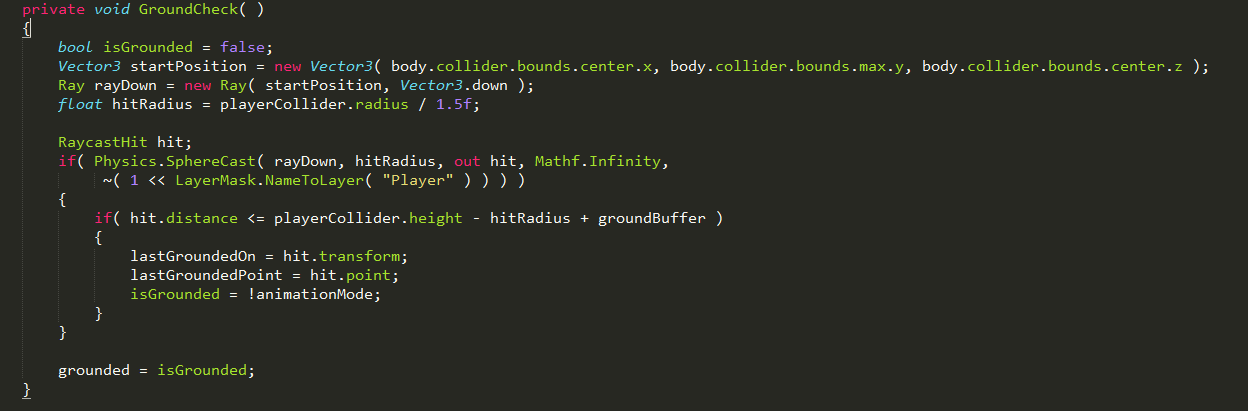
So it looks reasonable but there are several issues with this code that make it fragile, less readable and annoyingly verbose, first lets add some comments to the code here and delineate clearly where things happen and why.

So now looking at the spherecast, i'm creating a ray here to perform the sphere cast but is it necessary to create a new object EVERY game cycle just do define the direction? No, in fact there is an alternative method we can call that takes the origin and direction instead of a Ray object instance, lets do that and eliminate the Ray altogether. It'd be nice to get rid of startPosition as well, but it IS necessary, because it must be calculated each game cycle and the Physics::SphereCast method has no overload for x,y,z instead of a Vector3.
That hitRadius though, it uses the player collider radius .. will that change somehow during a fall? Currently, it does not, so this is something we could move right out of the GroundCheck method and initialize once during startup, saving object churn and processing time. The programming vernacular for analysing where lines of code impact performance the most is "finding the critical path of execution". The GroundCheck() method is run every game cycle and therefore inefficient code here can have a profound impact on the overall performance of your game, so in this case, regardless of readability, i'm going to cut and slash anything possible to make this as fast and efficient as possible, lets look at what we have after this round of refactoring fun:

That is starting to look a lot better, much more readable and concise despite the extra comments. We are not done however, there is a BIG hit here which concerns me in the form of:

The problem here is that we have several operations happening. First, the "Player" static string can mean there is a temporary object created for a string literal, which i know is the case for Java but perhaps C# uses some optimizations like Java's static string pool?
http://stackoverflow.com/questions/4286614/c-sharp-do-string-literals-get-optimised-by-the-compiler
Not too clear to me, and frankly we could be running in a variety of target platforms so why even chance it, besides, there is more. Another issue is that we invoke NameToLayer each game cycle, I'm not sure on the performance of this, but it's not better than avoiding it in the first place that is for certain. Then you have the bitwise shift operation and finally applying ~ to do a bitwise complement on the resulting value. That is what, at least 3 operations and one object creation (potentially). So looking at this, do we even NEED to have this calculated each time? No, because the players layer never changes so lets wrap this in a constant and use that instead.
There is one final optimization to consider, is the following:

But in this case we don't know that the player collider will always be the same HEIGHT, for instance, we could be moving along in a crouched position or doing a dive roll. So this seems a reasonable calculation, using Mathf.Infinity to sphere cast downwards with avoids this calculation at the cost of finding more "hits" due to the distance, so let's adjust that to a smaller value that we still know will be further than what grounded distance should be and call it a day.
The resulting code is like so:

Seems to work well so far!
Tuesday, 19 February 2013
Beasties - Meet Louisville!
Roughed in 2HD melee weapons - all pertinent animations are there and it's looking good so far, need to go over attack animations and crouched lower body movement once all bits are in place. Also captured forward movement into some blend trees and added some guard logic to ensure that even if an animation is not played out correctly, we still can fully holster a weapon.
2HD weapon pose below and its corresponding mecanim state machine.


Tonight, I think i'll push and get 1hd melee in place as well, possibly rough in rifle/shotgun too :) - though i'm thinking that shotgun will require its own unique animation set from rifle, will try it out and see what things look like however.
One comment already was in regards to arming a weapon at the start - i'd like to avoid that but understand the reason for the ask, it's hard to know what is what atm. Going to look into adding question location tracker and add some quests / hud as things progress, not a priority though as there's still lots of work to be done with animations - rifle/sg, 1hd those are focus tonight - after that it really comes down to a lot of testing and note taking to discuss with animator here and get things looking just right.
Something i'd really enjoy starting in on are mountable gear items - things like backpacks, armour/clothing (yay!), weapons, etc... they need to be encapsulated with their own scripts/prefabs and handled dynamically instead of just mounting each one and disabling its mesh renderer.
So back around we go again, finishing up the remaining core combat animations then going back and testing tweaking and more testing - still lots of areas that could be improved in target matching and smoothing out animation transitions/looking.
2HD weapon pose below and its corresponding mecanim state machine.


Tonight, I think i'll push and get 1hd melee in place as well, possibly rough in rifle/shotgun too :) - though i'm thinking that shotgun will require its own unique animation set from rifle, will try it out and see what things look like however.
One comment already was in regards to arming a weapon at the start - i'd like to avoid that but understand the reason for the ask, it's hard to know what is what atm. Going to look into adding question location tracker and add some quests / hud as things progress, not a priority though as there's still lots of work to be done with animations - rifle/sg, 1hd those are focus tonight - after that it really comes down to a lot of testing and note taking to discuss with animator here and get things looking just right.
Something i'd really enjoy starting in on are mountable gear items - things like backpacks, armour/clothing (yay!), weapons, etc... they need to be encapsulated with their own scripts/prefabs and handled dynamically instead of just mounting each one and disabling its mesh renderer.
So back around we go again, finishing up the remaining core combat animations then going back and testing tweaking and more testing - still lots of areas that could be improved in target matching and smoothing out animation transitions/looking.
Subscribe to:
Posts (Atom)